nmon Upload & Graph website hosted on IONOS UK

Upload your nmon file to see nmonchart graphs in seconds


1) Select one .nmon file & then

2) Submit it for uploading and graphing

to upload the file, generate the graphs & sent them to you.


Want to quickly see what the graphs look like?

Simple sample graphs: sampleC.html
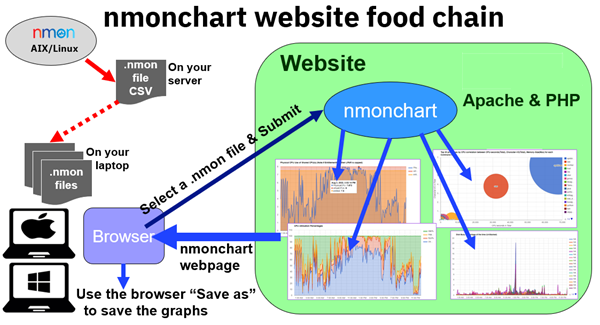

The Details and Notes (only read this for the full internal details or if you have a problem):
  1. This website is experimental and might be withdrawn without notice.
  2. The graphs make use of the Google Charts library, so you need to be on the Internet for them to work.
  3. Please report any problems and mistakes so they can be fixed or good ideas.
  4. Saving your graphs:
  5. nmon files:
  6. Problems:
    1. Note: nmon files are simple text in a comma separated value (CSV) format - you can edit them with the "vi" editor or similar.
    2. If you end up with a blank screen or buttons failing to produce graphs we have a data or nmonchart issue. Please email me the filename and I will investigate.
    3. Perhaps, the "nmon file" is not in nmon format at all. For example, it is a topas format file or vmstat output or empty!
    4. If there is only one data point it will work but look odd.
    5. If nmon was killed, then the last output line might not be complete. Check with: tail filename.nmon
    6. You corrupted the nmon file somehow, perhaps badly FTPing the file, compressed it or fiddled about with it.
    7. If you get "filename, already exists" errors, rename your file.
    8. If you get a red error message, then there are problems in the data or resources changed while nmon was running like disks added or removed.
      • This may require manual editing of the nmon file. It can be done but it is not trivial.
  7. Making this better for other nmon users:
  8. Security and confidential data
    1. nmon files do not contain any personal, private, or sensitive data.
    2. They do include the server Serial number, IP addresses, perhaps file system mount point names might reveal some software on the server.
    3. If you don't want to share those details with Mr nmon then use the "sed" command to remove them from the file.
      1. To avoid problems, replace them with "ABCDEFG" or "999.999.999". Below the IP Address starts with "192.168.10"
      2. Example: cat abc.nmon | sed 's/219A297/ABCDEFG/g' | sed 's/192.168.10/999.999.999/g' >abc_safe.nmon
    4. Uploaded files are removed on a regular basis.
    5. Mr_nmon may look at these uploaded files to look for common problems and develop this tool to make recommendations or analyse them with AI tools.
    6. The nmon files will not be shared with anyone else.

Version 20250301